
OCF play a key role in Computing Insight UK (CIUK) conferences, through sponsorship of the event and delivery of the Student Cluster Challenges. Following the success of previous challenges and particularly the last one at CIUK 24, which I was closely involved with, OCF had the privilege of being invited again to do the same for CIUK 25.
Together with the OCF Research and Development Team, I prepared and delivered the challenge which was thoroughly enjoyable at each stage (if slightly hectic!). It was well-received by the students and conference organisers.
Here’s an overview of planning, delivery and evaluation:
The OCF R & D Team was tasked with preparing for the challenge. An OCF Project Manager was assigned for the first time; and this helped with structure, clarity and timely delivery of objectives.
We used the overall conference theme of ‘Computing Unites’ as inspiration to build the challenge around ‘monitoring and alerting’ . This would provide a unified service for engineers, System Administrators (SysAdmins) and project managers and give multi-layered visibility across infrastructure including systems, dashboards and notifications sent to destinations such as email or Slack channels.
At the infrastructure level, various options were considered. On-premises virtualisation, e.g. Proxmox (the virtualisation environment for OCF Steel Stack) and public cloud providers including Amazon Web Services (AWS) and Microsoft Azure. AWS was selected for its wide-ranging benefits including flexibility, scalability and simplicity in provisioning resources. Each student team received a minimal four-node cluster of EC2 instances, totalling up to 36 machines when combined with OCF’s development/testing cluster. This setup also provided the ability to quickly allocate additional VMs if required.
Our initial challenge documentation was essentially a step-by-step monitoring guide. Whilst this was clear and helpful for developing the challenge, we decided to switch to a more realistic, customer project-style ‘Statement of Work’ which was designed to give students a flavour of life as an HPC engineer.
Deployment was handled via Terraform and Ansible—tools the author uses extensively at OCF. The entire environment could be set up with two commands:
terraform apply
ansible-playbook -i inventory/aws_ec2.yml site.yml
Within Ansible, a dynamic inventory file was essential to handle IPs changing when EC2 instances are stopped and started. changing (Elastic IPs can be used to avoid this issue but we were looking at cost-saving where possible).
Developing the code for this clearly takes significant time, but once is it completed, you can create and destroy a whole environment, or any required parts of it, rapidly, repeatedly and consistently.
To provide secure access to teams, we used Microsoft Forms for each student to submit a public SSH key. These were then added to the relevant team’s management VM via an Ansible SSH role.
GitLab provided source control and enabled collaboration and ease of viewing commit history. Internal documentation was written to ensure that any OCF engineer could manage the challenge if required.
Students were asked to deploy and configure a suite of monitoring and observability tools widely used in HPC and modern cloud environments:
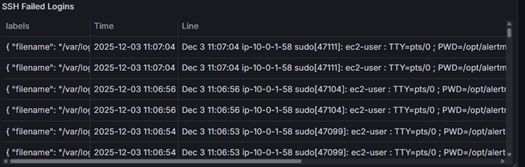
SSH Failed Logins from Loki Data Source – Grafana Panel
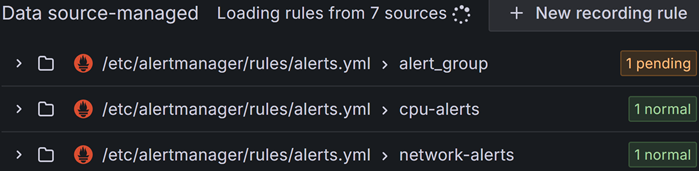
Data source-managed (via alert file configuration) Grafana Alert rules

Example Test Alert notification sent from Grafana Alerts
to private Slack channel via Incoming Webhook
This is not an exhaustive list of tasks but gives an idea of requirements. Scoring was based on technical accuracy and quality of documentation written by each team.
OCF R & D collaborated with an OCF Compute Engineer to thoroughly test the challenge and ensure instructions were clear, realistic, and of a suitable difficulty level. This internal review process enabled us to identify and fix configuration issues before the event.
D-Day arrived on Friday 5th December 2025. Terraform and Ansible proved their worth and ensured that the environment was running as expected before students began their work. Some things never quite go as expected and the deployment took a little longer than anticipated - I was glad I began an hour in advance!
Successes:
Lessons Learned: